Darbuka Virtual
Developer RecehMusic
4.32.00 Reviews
- Version
- 1.88
- Installs
- 1.00M
- Age Rating
- Everyone
Screenshots
Our Review of Darbuka Virtual
 Analysis by Appyee
I approached Darbuka Virtual as a small, focused music game rather than as a full instrument-learning course. Its central idea is simple: turn the darbuka into a playable screen instrument, then let me tap out rhythms and try to cover songs. That narrow purpose is also its appeal. I can open it when I have a few spare minutes, experiment with beats, and enjoy the feel of making a rhythm without carrying a physical drum.
The game comes from Developer Receh and is free to use. It is aimed at everyone, so it is easy to recommend as a casual experiment for families, curious beginners, and anyone who enjoys tapping along with music. The app has also reached over a million installs, with an average rating of 4.3 from nearly a thousand ratings. Those figures suggest that the basic concept connects with a broad audience, although they do not turn it into a replacement for a real darbuka or a structured music teacher.
What the virtual darbuka feels like in everyday use
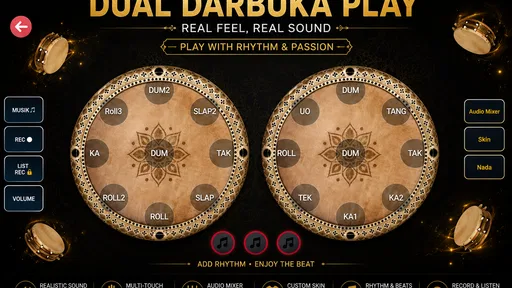
The first thing I noticed is how quickly the game gets to its main activity. There is no need to understand musical notation before trying it. I can treat the screen like a compact drum surface, tap different areas, and listen for the resulting rhythm. That makes the experience approachable for someone who has never held a darbuka, while still leaving room for a more practiced player to test timing and hand patterns.
Its store summary presents it as a darbuka musical application for covering songs, and that description matches the way I would use it. I would not launch it expecting a long story, character progression, or a large collection of unrelated mini-games. The value is in the direct interaction: choose a rhythm idea, follow the pulse of a song, and adjust my taps until the pattern feels closer to the music.
A realistic use case is a short break after work or school. I can put on a familiar song at a comfortable volume, keep the phone in my hands, and use the virtual drum to follow the main beat. Even when the result is rough, the activity is more engaging than simply listening. It makes me pay attention to the song’s pulse, accents, and repeated sections.
That same simplicity can become limiting if I want a complete musical workspace. A virtual instrument is most enjoyable when the touch response feels immediate and the screen remains easy to read. On a smaller phone, finger placement may feel cramped, especially if I try to play faster patterns. On a tablet, the larger surface should be more comfortable, but the experience still depends on how naturally the on-screen layout fits my hands.
I also think the game works best with headphones or a quiet room. Rhythm practice depends on hearing the difference between a clean hit and a late one. In a noisy environment, the taps can become less satisfying, and I may end up judging my timing by sight rather than sound. That is not a flaw unique to this title, but it matters more here because the entire experience is built around rhythm.
A useful starting point for beginners
For a newcomer, I would begin with a very small goal: keep a steady pulse before attempting complicated fills. I tap evenly for a while, then introduce a second sound only after the basic beat feels stable. This approach prevents the common mistake of tapping quickly just because the screen responds quickly. A virtual drum can make random activity feel musical for a moment, but steady timing is what makes a pattern enjoyable.
Another practical method is to practice away from a full song first. I can repeat a short rhythm, pause, and listen to whether the pattern still feels balanced. Then I can try it against a song with a clear beat. This two-stage routine is more useful than immediately chasing difficult covers, because it separates hand coordination from the distraction of following an entire track.
The app’s free price is important here. I can try this style of play without first buying a physical darbuka, finding storage space, or worrying about disturbing people with loud practice. That makes it a low-risk introduction. If I discover that I enjoy the instrument, I can later decide whether a real drum, a more advanced music app, or formal instruction is worth pursuing.
At the same time, free does not automatically mean complete. I would approach it as a casual instrument game, not as a guaranteed path to proper technique. A screen can help with rhythm awareness and coordination, but it cannot reproduce the hand position, rebound, tone control, or physical response of a real darbuka. Anyone hoping to build serious performance skills should eventually use a physical instrument or a more structured learning tool.
How I would use it for song covers
Covering a song with a virtual darbuka is less about copying every sound and more about identifying the song’s rhythmic backbone. I listen for the repeating pulse first. Then I use the on-screen drum to mark the strongest beats, leaving space rather than filling every moment. That restraint is a surprisingly useful lesson: a rhythm often sounds better when the taps support the song instead of competing with it.
For a simple workflow, I choose a familiar track, listen through once without playing, and notice where the beat changes. On the next pass, I play only the main pattern. On a later attempt, I add small variations at transitions. This gives me a clear way to measure improvement without needing a score or a formal lesson. I can tell whether I am staying with the music and whether my variations help or interrupt it.
There is also a social use case. A child or beginner can use the game to imitate a rhythm heard in a family song, then show the pattern to someone else. Because the app is rated for everyone, it is suitable for that kind of light, shared activity. I would still supervise younger players around volume and screen time, but the basic interaction is easy to explain without technical musical vocabulary.
The trade-off is that casual covering can expose the limits of a virtual setup. If the phone is held at an awkward angle, my hands may block part of the display. If I play while walking or commuting, movement makes accurate tapping harder. I get the best results when the phone rests securely and both hands have enough room to move naturally. A stand or stable surface can improve comfort, even though it does not transform the app into a professional instrument.
Fairness, spending, and the pressure to keep playing
From a spending perspective, the clearest advantage is that the game is free. I can explore the core idea without making an upfront purchase. That matters for a niche instrument such as the darbuka, because many people will be curious but unsure whether virtual percussion suits them. Trying it first is more sensible than committing to hardware immediately.
I do not treat the free label as proof that every possible part of the experience is equally open, so I avoid making assumptions about optional purchases or locked material. What I can say is that the basic decision is easy: install it, test the virtual drum, and decide whether the interaction is enjoyable. There is no reason to spend money merely to discover whether tapping a darbuka on a phone appeals to me.
Fairness in this kind of game is less about winning against other players and more about whether the app lets my timing matter. A rhythm tool feels fair when a careful, steady pattern sounds better than frantic tapping. It also feels fair when beginners can experiment without being pushed into a spending race. Darbuka Virtual is best understood in that personal-practice space, where the goal is enjoyment and coordination rather than ranking above another player.
That distinction helps set expectations. If I want competitive leaderboards, a deep progression system, or a large multiplayer community, this is probably not the right category of experience for me. If I want a free way to play percussion patterns and accompany songs, the lack of competitive pressure can actually be a strength. I can stop after a few minutes without feeling that I have fallen behind anyone.
There is a quieter kind of pressure worth noticing: the temptation to make every rhythm complicated. Beginners often assume that more taps mean more skill. I find the opposite more useful. I start with a pattern I can repeat cleanly, record the feel in my memory, and only then add variation. This keeps the game relaxing and makes progress depend on control rather than speed.
Where it compares well with other music options
Compared with listening to songs passively, this game gives me a more active relationship with the beat. I am not just consuming music; I am trying to support it. Compared with a physical darbuka, it is cheaper, quieter, and easier to carry, but it lacks the tactile feedback and expressive range of a real drum. Compared with a general drum-pad app, its identity is more specific because it centers on the darbuka rather than treating percussion as a collection of unrelated sounds.
That focus is useful for someone who already likes the character of darbuka rhythms. I do not have to begin with a large studio-style interface or search through a broad instrument library. The narrower design makes the app less intimidating. On the other hand, a general music-production app may be better for someone who wants recording, arranging, multiple instruments, or detailed editing. A rhythm-training app may be better for someone who wants lessons, exercises, and measurable progression.
The right choice therefore depends on the reason I am reaching for my phone. For quick rhythm play, song accompaniment, and casual experimentation, this title makes sense. For composing a finished track, learning formal notation, or developing professional percussion technique, I would choose a more specialized alternative. Its simplicity is a deliberate benefit for casual use, but it is also the boundary of what I expect it to provide.
Compatibility and practical expectations
The current version is 1.88, and the game runs on Android six or later. That makes it accessible on many older Android phones, which is helpful for a lightweight entertainment app. I would still check that my device has a comfortable screen and responsive touch input, because those physical details influence the experience more than raw age alone.
I would also set aside a little time to adjust my playing position. Holding the phone in one hand while tapping with the other is convenient for testing, but it is not the most comfortable arrangement for longer sessions. Resting the device on a stable surface gives both hands more freedom and makes repeated patterns easier to maintain. This is one of those small changes that can make the game feel more musical without changing any setting.
Because the age rating is Everyone, I see it as suitable for a broad audience, including beginners who may be cautious about complex music software. Still, suitability is not the same as universal appeal. Someone who dislikes repetitive tapping, needs polished studio tools, or expects a large campaign will likely find the experience too narrow. The game rewards curiosity about rhythm, not a desire for constant new content.
What I would want to understand before installing
A reader may reasonably wonder whether this is a learning app or an entertainment game. I would place it closer to entertainment with a useful musical side effect. It can help me notice tempo and practice coordination, but I would not rely on it as a complete course. The best results come when I use it alongside listening, repetition, and, eventually, guidance from a real player or teacher.
Another question is whether it suits someone with no darbuka experience. Yes, as long as the goal is to explore rather than master the instrument immediately. The direct tapping format lowers the entry barrier, and I can begin with simple patterns. The important expectation is that the screen introduces the idea of the instrument; it does not reproduce every physical skill involved in playing one.
It is also worth asking whether it is useful for experienced percussionists. I think it can work as a portable rhythm sketchpad or a quiet way to pass time, especially when a physical drum is unavailable. However, an experienced player may quickly notice the limitations of a phone surface. For serious rehearsal, tone development, and nuanced technique, the real instrument remains the stronger choice.
Finally, I would ask whether the free format makes it a good first step before buying hardware. In my view, yes. A few casual sessions can reveal whether I enjoy keeping a beat, whether the darbuka’s sound interests me, and whether I am willing to practice regularly. That is useful information to have before spending on a physical drum. I would simply avoid treating a positive first impression as proof that the virtual and physical experiences will feel identical.
My trust verdict after weighing the trade-offs
Darbuka Virtual earns my recommendation as a focused, low-pressure music game. Developer Receh keeps the concept understandable: I open it to play darbuka-style rhythms, follow songs, and experiment with timing. Its free access and Everyone rating make it an approachable choice for a first try, while its popularity and 4.3 average rating indicate that many players have found the basic idea enjoyable.
The strongest reason to try it is the low commitment: I can explore a distinctive percussion instrument before buying hardware or investing in lessons. I would use it during short breaks, for rhythm games with family, or as a quiet companion when I want to interact with music instead of only listening. The most effective approach is to keep patterns simple, use a stable phone position, and build accuracy before adding speed.
I would skip it if my priority is professional recording, formal instruction, competitive play, or a realistic substitute for a physical darbuka. Those needs call for different tools. For everyone else, especially curious beginners, this is a sensible free introduction with a clear purpose. It does not need to be a complete music studio to be worthwhile; it just needs to make tapping a steady, enjoyable rhythm feel rewarding, and in that role it succeeds.
Verdict
Strengths of Darbuka Virtual
- Responsive touch controls make rhythms easy to play.
- Includes authentic darbuka-style sounds for varied beats.
- Works well for quick practice sessions anywhere.
- Simple interface is suitable for beginners.
- Can help users explore Middle Eastern percussion rhythms.
Limitations of Darbuka Virtual
- Sound quality may depend heavily on your device speakers.
- Limited features may feel basic for experienced musicians.
- Playing accurately can be difficult on smaller phone screens.
- May become repetitive without recording or lesson tools.
- Some devices may show occasional touch or latency issues.
Similar Picks in This Category
View All
Tiles Hop Music & Ball Game
AMANOTES PTE. LTD.4.3

Magic Tiles 3™ - Piano Game
AMANOTES PTE. LTD.4.6

Real Piano
Bilkon3.7

Piano Game: Classic Music Song
Dream Tiles Piano Game Studio4.0

Smash Colors: Music Ball Rush
BADSNOWBALL HONGKONG LIMITED4.2

Piano Music Go-EDM Piano Games
Joy Journey Music Games4.5
Frequently Asked Questions
What is Darbuka Virtual, and how does it work?
Darbuka Virtual is a mobile drumming app that turns your Android or iOS device into a playable darbuka, a traditional goblet-shaped hand drum. After opening the app, you tap different areas of the displayed instrument to produce bass and rim sounds. Its straightforward layout makes it suitable for casual rhythm practice, experimenting with beats, or adding percussion to music sessions without carrying a physical drum.
Is Darbuka Virtual suitable for beginners?
Yes, Darbuka Virtual is generally easy for beginners to understand because its main controls are based on tapping the virtual drum surface. You do not need previous darbuka experience to start creating simple rhythms, and the responsive interface allows you to learn by experimenting. However, users seeking detailed lessons, notation, or structured percussion training may find the app more limited than a dedicated music-learning platform.
Can I use Darbuka Virtual without an internet connection?
The core drumming experience in Darbuka Virtual can usually be accessed without a continuous internet connection once the application is installed. This makes it convenient for practicing rhythms while traveling or in places with limited connectivity. Internet access may still be required for downloading the app, receiving updates, viewing advertisements, or using any online features included in the particular version available on your device.
Does Darbuka Virtual offer realistic sound and responsive controls?
Darbuka Virtual provides a convenient approximation of darbuka playing through recorded or digitally produced percussion sounds, with different tap positions helping create contrasting tones. Its responsiveness depends partly on your phone or tablet’s touchscreen and audio performance. It can be enjoyable for casual playing and rhythm ideas, although it should not be expected to reproduce the volume, resonance, or expressive control of a real darbuka.
Is Darbuka Virtual free to download, and are there advertisements or purchases?
Darbuka Virtual may be available as a free download, but the exact monetization model can vary according to the version and store listing available in your region. Free editions commonly support development through advertising, while some versions may include optional purchases or upgraded features. Before installing, check the Google Play or App Store page for current pricing, in-app purchase details, permissions, and the latest privacy information.
Play our best games!


